Text message consent
Badger sends text messages on behalf of home-service contractors (for example electricians, pool and lawn services, painters and roofers) to their own customers. Texts go only to people who asked that contractor for a quote or service and agreed to receive texts about it. Badger does not send marketing texts and never texts purchased or shared lists.
How a customer opts in
- The customer requests a quote. The customer contacts the contractor (in person at the job site, by phone, or through the contractor's website or social media), asks for a quote, and gives their mobile number so the contractor can text the quote and updates about it. The contractor tells the customer they'll receive texts about the quote and can reply STOP at any time.
- The contractor confirms consent in Badger. A quote cannot be sent until the contractor checks a required box that reads: "This customer asked me for this quote and is OK getting texts about it." Badger records this confirmation with the quote.
- The first text identifies the business and how to opt out. The first message names the contractor's business, explains why the customer is receiving it, and ends with "Reply STOP to opt out."
Verbal consent script
Contractors are required to ask for consent in these words (or words to the same effect) before entering a customer's mobile number:
Customer: "Yes, that's fine."
Contractor: "Great. You'll get a text from [Business name] with your quote in a few minutes."
If the customer says no, the contractor does not enter the number for texting and shares the quote another way.
How consent is recorded. When the contractor checks the consent box, Badger stores the confirmation on the quote along with the date and time and the team member who confirmed it. The record stays with the quote, and Badger will not send a quote without it.
How to opt out. The first text, and any message on request, says "Reply STOP to opt out." Replying STOP, UNSUBSCRIBE, CANCEL, END or QUIT stops all texts from that business right away and sends one confirmation. START resumes texts, and HELP replies with how to reach support.
The consent step in the Badger app
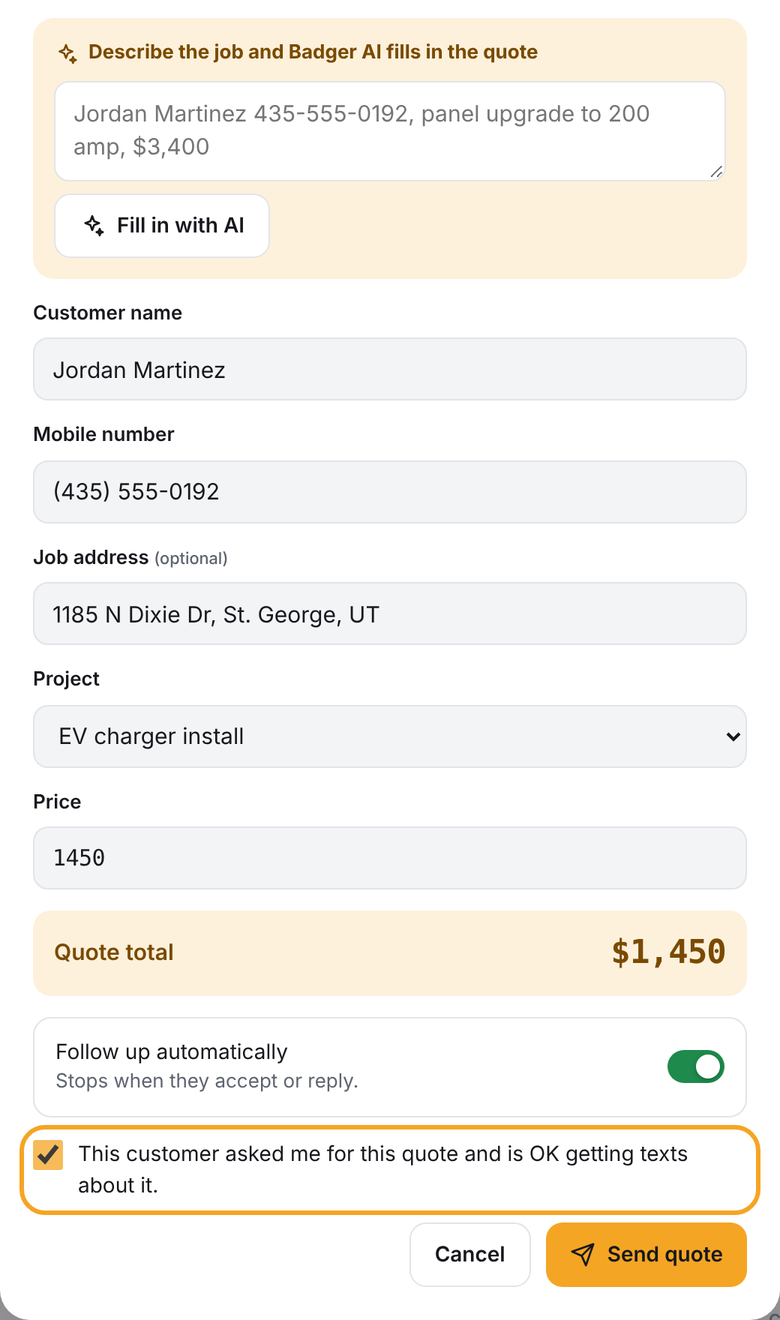
The New quote form in Badger. The Send quote button won't send until the consent box is checked.
Sample first message
You can accept and pick your start date right from that page.
Reply STOP to opt out.
What customers receive
| Message | When |
|---|---|
| The quote link | When the contractor sends the quote |
| Up to four follow-ups about the quote | Over about 30 days, only between 9am and 7pm local time, stopping as soon as the customer replies, accepts or opts out |
| Booking confirmation and job updates | When the customer accepts and as the job progresses |
| Service reports and payment receipts | After a visit or payment |
| Replies to the customer's questions | When the customer texts back |
Message frequency varies. Message and data rates may apply.
Opting out and getting help
- Reply STOP (or STOPALL, UNSUBSCRIBE, CANCEL, END or QUIT) to stop all texts. The customer receives one confirmation and no further messages. Badger blocks any future texts to that number.
- Reply START to receive texts again.
- Reply HELP for help: "Badger: Texts about your quote or job from a local contractor. Help: support@trybadger.net. Msg & data rates may apply. Reply STOP to opt out."
Privacy
No mobile information will be shared with third parties or affiliates for marketing or promotional purposes. Text messaging originator opt-in data and consent will not be shared with any third parties. Read the full Privacy Policy and Terms of Service.
Texts from Badger itself
Contractors who sign up for Badger's pilot on trybadger.net can choose to receive texts from Badger about their pilot spot by checking an optional, unchecked box on the form: "Text me about my pilot spot. Msg & data rates may apply. Reply STOP to opt out."
Contact
Keoni Tabon, doing business as Badger · Washington, Utah · support@trybadger.net